1,000 mojDMS Integration Agreements: Eight Years of Digitalizing Document Workflows
These days, we signed the 1,000th integration agreement for the mojDMS solution.
The number itself is a nice occasion to reflect, but on its own it does not say much. What is interesting is what stands behind it: 1,000 different companies, 1,000 different ways of handling documents in Serbia, and eight years of learning from the people who process those documents every day.
Who is the 1,000th client?
We signed the 1,000th integration agreement for the mojDMS solution with ABB DOO BEOGRAD, a member of the ABB Group, one of the world’s leading technology companies in the fields of electrification and automation.
ABB has been present in Serbia since 1990, while ABB d.o.o. Beograd supports companies and projects across the domestic market through its operations and expertise.
Its long-standing presence, international business standards, and the complexity of the processes such an organization manages on a daily basis make ABB a particularly significant partner for our 1,000th mojDMS integration agreement.
That is why we are especially pleased that ABB is becoming part of this milestone. Integrating with a company operating in a demanding international business environment is another confirmation for us that mojDMS can adapt to different organizations, processes, and levels of business complexity.
We would like to thank ABB for its trust and look forward to working together on organizing and improving document flows and business processes.
Why this agreement means more to us than a number
The 1,000th signature is no more valuable than the first.
Every agreement represents a decision by a company to entrust someone else with part of a process that had previously been entirely in its own hands, and we do not take that decision lightly, even after a thousand repetitions.
What this number really shows is something else.
When 1,000 companies of different sizes, industries, and ways of working arrive at the same conclusion — that documents need to have a defined workflow — it is no longer simply a trend, but a change in the way business is conducted in Serbia.
For us, it is both confirmation that we are on the right path and a responsibility.
Every one of these companies relies on the system working every business day, keeping up with regulatory changes, and behaving predictably when it matters most.
That is why we do not see the 1,000th agreement as the end of one phase, but as a measure of the responsibility we have taken on.
How it all began
Docloop was founded in 2018, at a time when business digitalization in Serbia was still a matter of choice rather than an obligation.
The problem we wanted to solve was simple to describe and difficult to solve.
Documents were entering companies in five different ways, being processed in ten, and ending up in filing cabinets that nobody opened until an inspection came.
Between receiving an invoice and posting it in the accounting system stood someone’s drawer, someone’s annual leave, and someone’s memory of where the paper had been left.
mojDMS was created as an answer to that problem.
Not as a digital archive where scanned documents are simply stored, but as a system that guides a document through the entire process — from the moment it enters the company to the moment it is processed and archived.
How the system evolved
What we today call the core package was built gradually, based on what our clients were asking for.
It includes customized workflows and document types, a document archive, eDelovodnik for electronic registration and record-keeping, ePisarnica, incoming and outgoing invoice records, integration with the System of Electronic Invoices, and the ability to integrate with existing ERP solutions.
Over time, specialized modules were added: automated VAT calculation, eArhiv compliant with the Law on Archival Materials, Task Manager for tracking tasks and deadlines, eSigning, the archival book, and, most recently, eOtpremnice.
None of these modules was created in isolation.
Each one came from a specific conversation with a specific company that had a problem the system could not solve at the time.
Regulation as an accelerator
Part of our development was driven by regulation, and that is worth acknowledging openly.
The introduction of electronic invoicing changed the way the entire economy operates.
The obligation to archive documents electronically, introduced on January 1, 2024, forced companies to think of document retention as a process rather than a shelf.
The Electronic Delivery Notes System brought the same logic into warehouses and loading docks. The first obligations began to apply on January 1, 2026, while the full obligation to exchange electronic delivery notes between private-sector entities begins on October 1, 2027.
Our role in this is that of the first information intermediary licensed by the Ministry of Finance.
This means that companies using mojDMS do not have to build their own connections to government systems or independently track every technical change made to those systems.
The numbers behind the 1,000th agreement
Since our founding in 2018, more than 55 million electronic documents have been exchanged through our solutions.
According to our calculations, this is equivalent to approximately 13,000 trees and around 500 tons of avoided carbon dioxide emissions.
The growth of mojDMS can best be seen through a brief snapshot.
In the first seven months of 2025, the number of users increased by 25%, from 496 to 622 companies.
Today, with the 1,000th signed integration agreement, that trend continues.
More than 4,800 companies in total use Docloop solutions in their day-to-day operations, while the number of indirect users exceeds 220,000.
Our integrations cover more than 220 ERP systems, including SAP, Infosoft, and Navision.
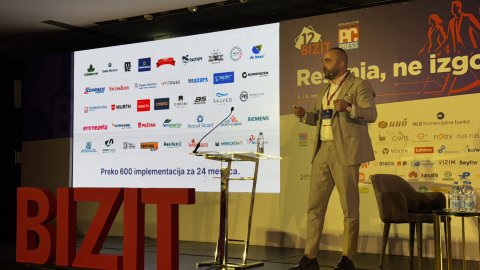
Among the companies that have placed their trust in us are Siemens, Zepter, Würth, Swisslion, MaxBet, AbelaPharm, Prvi Partizan, Matijević, Emmezeta, Forma Ideale, Peštan, Manpower, Mainstream, Schrack Technik, Fitpass, De Heus, Saint-Gobain, Vorwerk, Lesnina, Singidunum, and many others.
And, as of this month, ABB DOO BEOGRAD.
What 1,000 implementations have taught us
This section is our conclusion, not a statistic.
The first thing we have learned is that most of the work is organizational rather than technical.
Software can be installed in a week. Agreeing on who approves an invoice above a certain amount can take a month.
The second is that resistance to change almost never comes from a lack of knowledge, but from experience with systems that made people’s jobs harder instead of easier.
That is why we have insisted on adapting mojDMS to the existing way of working, rather than the other way around.
The third is that gradual implementation beats a massive transition.
Companies that start with one process and expand once it is working tend to go through the transition more smoothly than those that try to change everything at once.
And the fourth, perhaps the most important: digitalization does not succeed because someone bought a system, but because someone within the company took responsibility for making sure that system works.
That is the difference between implementation and a genuine change in the way work is done.
When a document is not enough
In recent years, we have noticed that companies are looking beyond document management.
A good example is our cooperation with the Public Utility Company “Vodovod i kanalizacija” Novi Sad, where we connected field employees with the central billing system through the e-Tereni application and water consumption calculation.
Here, the document is created in the field, not in the office.
And the entire chain runs from meter reading to invoicing.
This is the direction in which we see the next stage of development.
Not just the document being processed, but the process that creates it.
What the 1,000th agreement tells us about the next eight years
If we look at the journey from our first user to the 1,000th agreement, one thing has become clear: the boundary between “document management” and “business process management” is becoming increasingly thin.
Companies no longer want simply to know where a document is.
They want to know who needs to take action, what the next step is, what the deadline is, whether the data has already reached the ERP, whether the document has been properly archived, and what happens when a process moves outside its expected workflow.
That is why the next phase of mojDMS is not simply about adding more functionalities.
It is about deeper integration between documents, people, business applications, and processes that take place outside the office.
From eInvoice to eDelivery Note. From the archive to the field. From the document to the process.
Thank you — and what comes next
A thousand agreements mean a thousand decisions to entrust someone else with a part of the work that had previously been entirely in-house.
We are aware of that responsibility.
We would like to thank every company that has entered this process with us, especially ABB DOO BEOGRAD as the 1,000th signatory, as well as the team that builds and supports this system every day.
We are continuing in the same direction — with new functionalities, stronger integrations, and preparations for upcoming obligations, including the full implementation of the electronic delivery note system for exchanges between private-sector entities starting October 1, 2027.
That is why we do not see the 1,000th agreement as a full stop.
More as a comma.
Because behind every next agreement is another company, another process, and another way to make work that for years depended on paper, emails, drawers, and someone’s memory more organized, visible, and predictable.
If you are considering what an organized document workflow could look like in your company, schedule a free consultation.
Write to us at prodaja@docloop.rs or call us at +381 11 43 50 555.
www.docloop.rs